Toolkit: Build a Content Calendar for Nonprofit Campaigns

Use this toolkit to create a content calendar for your nonprofit’s campaign season, fostering stronger donor connections and enhancing your fundraising efforts.

By Anne Stefanyk

Alt Text: Concept image of a calendar, with a pin on the 30th of the month

When building a nonprofit campaign, planning your fundraising strategies is only half the battle. You also need a clear plan for getting the word out about your fundraising efforts, and that begins with a content calendar.

A strategic content calendar is the single best tool for shifting your pre-campaign planning efforts from chaos to control. Research indicates that 69% of the most successful marketers have a documented content strategy, compared to just 16% of the least successful marketers. A calendar unifies your communication into a consistent, powerful message that helps engage and retain your audience members.

This toolkit provides a practical, step-by-step framework for building a content calendar. We will focus on anchoring your strategy to your website, integrating all your channels, and using targeted storytelling to inspire action.

Step 1: Map out your campaign phases.

Before you plan any specific content, you must map out the emotional and tactical journey you want your supporters to take. To ensure your team is aligned, use a shared tool for collaboration. A spreadsheet, a simple document, or a project management tool like Asana works perfectly.

Begin by outlining the key phases of your campaign. Most fundraising campaigns have four distinct stages. Let’s use a hypothetical “Giving Day” campaign for a wildlife sanctuary raising funds for its veterinary hospital as our example.

  1. The Priming Phase (Building Awareness). This is your educational warm-up. The goal is to set the stage and demonstrate your funding need without making a hard ask just yet. For example, two weeks before the Giving Day, you could publish a “Day in the Life of Our Sanctuary Vet” blog post. This article should include compelling photos and storytelling to illustrate the complexity and cost of daily animal care, subtly highlighting why a fully funded wildlife hospital is so crucial.
  2. The Launch Phase (The Big Push). This is the official kick-off. Your content shifts from education to a clear, direct, and exciting call to action. All your channels should activate at once with a unified message. For example, at 8 a.m. on the Giving Day, you can send an “It’s Live!” email blast. Simultaneously, your website’s homepage changes to a Giving Day “hub” with a live-tracker, and your first social media posts announce the start of the 24-hour campaign.
  3. The Momentum Phase (Maintaining Energy). This is the long middle of the campaign, where you need to fight a dip in attention. Demonstrate progress made to donors and use social proof to encourage others to join in. For instance, at 3 p.m., you could post a short, celebratory video saying, “We just passed the 50% mark! Your gifts have already funded the purchase of a new X-ray sensor. Thank you! Can we get to 75% by dinner time?” This type of message shows real-time impact and creates a new mini goal.
  4. The Final Call Phase (Creating Urgency). This is your final, high-energy push to close the gap. Your messaging must be clear, direct, and time-sensitive to motivate supporters who have been waiting to make a donation. For example, at 9 p.m., you may send a “Final 3-Hour Countdown” email that clearly states: “We are $5,000 away from our goal. If you haven’t given yet, now is the time. Don’t wait—your gift before midnight will be a lifeline for our animals.”

Defining these core stages will give you the overarching structure you need to pepper in specific content types and messages throughout your campaign.

Step 2: Layer in content streams.

Your strategic content calendar should help you visualize how you can repurpose one piece of content across your entire ecosystem. This is the key to a robust multichannel strategy that reaches donors where they are.

Focus on your website content first. Your website is the one digital platform you own completely. It is the central hub where all action, donation, and deep engagement should happen.

Place your “pillar” pieces, like blog posts, video uploads, and testimonial drops, on the calendar. Then, build your email and social content around them.

Think of your website as the “hub” and your other channels as the “spokes.” For example, one long-form testimonial published on your blog (the hub) becomes the source material for many other pieces. It can become a quote graphic for Instagram, a “story of the week” feature in your email newsletter, and the emotional hook for a targeted social media ad.

For each phase, define the content needed for each channel. Create columns in your calendar for:

  • The date when the content should be published
  • The content topic or headline
  • The primary channel (e.g., blog, email, Facebook)
  • The task owner

For instance, during your momentum phase, you might have one team member post a “progress update” blog post by 2:45 p.m. Then, another staffer will have the green light to share that blog post’s key message, like a new animal photo or quote, across Instagram, Facebook, and LinkedIn, at 3 p.m. sharp.

This step is where a comprehensive project management system will be your best friend. You can use it to automatically send email or text notifications when it’s time for each team member to complete their tasks, ensuring seamless communication throughout the campaign.

Step 3: Populate with your stories and segments.

Stories make your campaign feel more urgent, personal, and real to donors, especially when you personalize them to each individual’s interests. Review your donor segments and assign specific stories or messages to different email segments.

For example, in the Momentum phase, you might send Email A (featuring an impact story) to your list of brand-new donors, but Email B (featuring a financial breakdown of impact) to your major donor segment. Major donors will appreciate greater transparency into the inner workings of your campaign and its anticipated outcomes, while new supporters will benefit from learning more about the purpose of your fundraising.

Bloomerang Fundraising’s donor segmentation guide also recommends using donor segments to send donors messages on their favorite communication channels. For example, a supporter who prefers text messages is more likely to respond to a campaign text than an email. Your calendar helps you plan for this, sending the right story to the right person on the platform they choose.

Step 4: Review for gaps and accessibility.

Evaluate your calendar from a higher level to ensure you haven’t overlooked any key necessities. Ask yourself questions like: Are you posting too much on one channel and neglecting another? Is there a week with no website content? Are your calls to action clear?

This is also the final check to ensure all planned materials, especially website assets, are accessible. Accessibility is crucial to creating an inclusive nonprofit campaign that enables everyone to participate. Your mission is for everyone, and your campaign content should be, too.

Key accessibility elements to check for include:

  • Readable fonts
  • Alternative text for images
  • Video captions or transcripts
  • Clear website navigation
  • Hierarchical web page design
  • Keyboard navigability

Kanopi Studios’ nonprofit website design guide recommends using both automated and manual checks to ensure you don’t miss any accessibility issues. Automated tests use tools like Lighthouse or Axe to help identify accessibility issues. Manual testing involves someone engaging in user testing, often with the help of assistive technology like a keyboard or screen reader tool, to evaluate your site’s usability.

Step 5: Measure, adapt, and improve.

Your content calendar should be a living document, not a rigid set of rules. The launch of your campaign marks the beginning of your next discovery process, involving constant testing and iteration.

Use a combination of tools such as Google Analytics and your website builder to track key campaign metrics such as:

  • Website traffic
  • The time visitors spend on core web pages
  • Landing page conversion rates
  • Email click-through rates
  • Social media engagement (likes, comments, shares)

If one type of content clearly resonates with your audience, adjust your calendar to capitalize on that success. For instance, if your “Meet the Animals” testimonial series is leading to major donation conversions, center your social media and website content around that to maximize your outreach efforts.

This continuous improvement model ensures that your strategy gets smarter with every campaign you run. Additionally, you can apply this approach to major, multi-year campaigns, such as a capital campaign. These longer fundraising initiatives offer an incredible opportunity to test your messaging and organization efforts, taking you from a novice planner to an expert communicator over the course of the campaign.

Build on what works, and discard what doesn’t—that’s the key to long-term fundraising communications success.


A well-planned content calendar does more than just organize your posts. It frees your team from the daily panic of “what do we post?” and empowers you to focus on what truly matters: building connections.

With this mindset, you can transform your nonprofit website from a simple digital front door into a dynamic hub for promoting both your current campaigns and your mission as a whole.

Anne Stefanyk is the Founder and CEO of Kanopi Studios, a leading digital agency that designs and builds websites for mission-driven organizations. With deep expertise in strategy, user experience, and open-source technologies, Anne has guided Kanopi to become a trusted partner to nonprofits, higher education, and healthcare institutions.

Since launching Kanopi in 2010, Anne has fostered a people-first culture and a strong commitment to accessible, sustainable web practices. Her team creates inclusive digital experiences that help organizations make meaningful impact.

Follow Anne:

X

Drupal

LinkedIn


How to Use Your Website to Promote Your Nonprofit Online

Whether you’re setting up your website or improving an existing one, explore best practices for promoting your nonprofit online effectively in this guide.

By Carl Diesing

Your website is an essential tool in your online marketing kit. It serves as the foundation of your digital strategy by providing a place for any individual to find the information they seek about your nonprofit, whether that’s your mission statement, impact on beneficiaries, how to donate, or volunteer sign-up forms.

As a small nonprofit, you may have created a website but not had the bandwidth to flesh it out and optimize it fully. Or, you may not have dedicated marketing professionals on your staff, leading to confusion over how best to handle your website marketing efforts.

Whether you’re just setting up your website or wanting to improve your existing one, here are four best practices to implement on your website to effectively promote your nonprofit online.

1. Create all the important pages you need.

If you’re just starting your website, you might feel overwhelmed with how many pages you need to set up. However, it all boils down to the essential information that web visitors might want when they land on your website.

To meet those needs, start with these key pages:

  • About
  • Mission/Values
  • Donate
  • Volunteer

If you’ve already created these pages, start your website refresh with some spring cleaning. Look through your existing website and check that all your pages are updated and accurate. As nonprofits grow and change, their missions and audiences evolve, requiring adjustments to marketing materials like your website to ensure you deliver a consistent message to your supporters.

Later on, when your nonprofit has the time and resources, you can expand your website by adding other important pages like the ones below:

  • History
  • Our Team
  • Financials
  • Events/Calendar
  • Resources/Blog
  • Online Shop

Your cause may also impact the additional pages you should add or build. For example, a food bank might create a dedicated in-kind donation page listing all the specific food items they’re running low on and what they would like donated. Or, a nonprofit aquarium might have a page highlighting its standout exhibits and animals.

2. Make navigation simple and intuitive.

It’s not enough to simply create the pages web visitors are looking for—you must make it easy for supporters to explore those pages. To do that, prioritize simple and intuitive navigation that boosts the user experience. You can achieve that with the following strategies:

  • Keep menu structure simple: Limit the items in your navigation menu by only adding essential pages. Make sure that each page is labeled in an easy-to-understand and concise way.
  • Organize information logically: If your navigation menu has many items in it, you may benefit from grouping pages into subcategories to minimize the number of clicks needed to find information. For example, you might create a “Support” category for your donation, volunteer, and events pages.
  • Implement a sticky navigation bar: Ideally, web visitors should be able to access your menu on every page through a navigation header or footer. Take that principle a step further by adding a sticky navigation bar, which keeps your menu visible as users scroll down your pages.
  • Incorporate clear calls-to-action (CTAs): Encourage visitors to take the desired next action by adding clear CTAs in strategic areas of your site. Nonprofits usually add a large button-style CTA to their navigation bar leading to their donation page, but you can also add buttons to other pages in other relevant areas.
  • Add a search feature: At times, visitors may be looking for a page or piece of content that’s not readily available through your navigation headers. In those cases, having a dedicated search feature is extremely helpful and enhances the overall user experience.

Generally, the first few versions of any website, nonprofit or not, leave much to be desired. That’s completely normal—after all, when you first launch your website, you’re also busy with plenty of other responsibilities associated with starting a nonprofit.

Once your organization has achieved some stability and is ready to reinvent its website to supercharge its marketing potential, implement an accessible design and incorporate your nonprofit’s branding for better user experience and brand visibility.

3. Implement SEO best practices.

Part of what makes a website such a useful tool for nonprofit marketing is its ability to be discovered organically through search engines. However, you can’t rely on people Googling your nonprofit’s name to discover your website. Ideally, it should be discoverable through other relevant keywords.

That’s where search engine optimization (SEO) comes in. To ensure your nonprofit gets noticed online, leverage the following SEO best practices:

  • Use clean URLs: Short and concise URLs help search engine crawlers index your page and easily understand what it’s about, resulting in better search engine results.
  • Incorporate keywords naturally in content: Gone are the days of adding SEO keywords to web content as many times as possible. Now, search engines prioritize authoritative, comprehensive content. Create high-quality content with natural keyword incorporation to provide value to readers and signal to search engines what your content is about.
  • Add alt text to visual elements: Not only is this a great accessibility practice, but this also helps search engines understand what your visuals are about. Since search engines have dedicated image and video search sections, adding alt text enables your images and videos to show up for related queries.

Use analytics from Google Search Console and other SEO tools to assess whether your new practices are working. Taking a data-driven approach ensures that you know which changes are most impactful for your nonprofit’s visibility, allowing you to refine your SEO strategy for the future.

4. Create engaging content.

To maximize your nonprofit’s chances of leading web visitors to a desired action, you want visitors to stay on your site for as long as possible. Once your nonprofit can dedicate the time to do so, create a resource hub and blog and populate these pages with engaging content that captivates your audiences and keeps them on your site.

Here are a few tips for boosting engagement with content:

  • Create content regularly: When your community knows they can expect content from your organization regularly, they’ll be more likely to visit your site and see what new resources or insights you’ve posted. Increased interaction with your site may lead them to make a donation, sign up to volunteer, or register to attend one of your events.
  • Add visual elements: Visual elements help visitors digest your content by breaking up large blocks of text. Plus, they can be used to summarize key information. For example, if you publish a quick summary of your nonprofit’s annual impact report, you might also create an image that summarizes your key accomplishments.
  • Incorporate interactive content: Interactive content is generally more engaging to web visitors than content that they simply read or watch. Polls, quizzes, slideshows, social media feeds, and other elements can draw visitors’ attention and keep them on your website.

To ensure your content is truly engaging, ask yourself one core question: what would your audience be interested in? For instance, if you run a community church and you want to attract new congregants, you might highlight ministry games played at Sunday School, reflections on scripture, and practical guidance on how faith relates to daily life.

Depending on your audience, you can get creative or playful with your content. For example, the Atlanta Humane Society, an animal shelter that helps homeless animals find loving homes, posted a fun blog post from the perspective of a cat holding the website hostage.


Getting your nonprofit noticed through your website is only the first step to a robust marketing strategy. Afterward, focus on how your website delivers an experience that leads visitors to interact further with your mission and get involved in the long term. Then, consider how your marketing channels support donor retention to nurture relationships and build a base of loyal supporters who are passionate about your cause.

Carl Diesing is the Managing Director of DNL OmniMedia, which he co-founded in 2006, and has grown the team to accommodate clients with ongoing web development projects. Together, DNL OmniMedia has worked with over 100 organizations to assist them with accomplishing their online goals. As Managing Director of DNL OmniMedia, Carl works with nonprofits and their technology to foster fundraising, create awareness, cure disease, and solve social issues. Carl lives in the Hudson Valley with his wife Sarah and their two children, Charlie and Evelyn.


How to Encourage Donations on Your Nonprofit’s Website

Your website can be a great marketing tool, but it can also help your nonprofit raise funds. Learn how to encourage donations on your nonprofit website. 

By Ira Horowitz

Your nonprofit’s website is more than just a hub for your online presence—it’s a versatile platform that can help you connect with supporters, amplify your mission, and make a lasting impact. 

However, one of its most important functions is as a tool for fundraising. If designed correctly, your website can be an unstoppable force in driving donations. When your website is optimized for online giving, it can make donating a seamless and rewarding experience for your supporters. This is essential because 63% of donors prefer to give online!

Below we will explore actionable tips and strategies to help you design or revamp your website to turn it into an effective fundraising powerhouse. Whether you’re looking to inspire first-time donors or make recurring donations easier, these insights will guide you toward creating a site that encourages generosity. 

1. Create prominent donation buttons. 

Donation buttons are a critical part of a well-designed nonprofit website. They act as clear calls to action, guiding visitors toward supporting your cause. A strategically placed, well-designed button can simplify the donation process, reduce hesitation, and increase conversion rates. The more prominent and appealing the button, the more likely visitors are to notice it and act.

How to Create Effective Donation Buttons 

  • Use contrasting colors. Choose colors that stand out from the rest of your website but still align with your branding. For instance, if your site has a neutral color palette, a bright green or orange button can grab attention. High-contrast buttons improve click-through rates because they are easier for users to spot.
  • Write clear and action-oriented text. Use direct language that tells users exactly what to do, such as “Donate Now,” “Support Our Mission,” or “Give Today.” Avoid vague terms like “Click Here.” Action-oriented text creates urgency and communicates purpose.
  • Place buttons with care. Place donation buttons in high-visibility areas, such as your website header, at the top of your homepage, and near impactful content like success stories or impact videos. Repeat them in the footer and on pages dedicated to your programs. Consistency ensures users can donate no matter where they are on your site.
  • Ensure all buttons work and lead to the correct place. Test each button regularly to confirm it works and links directly to your donation form. Broken or misdirected links can frustrate visitors and lead to lost donations. 

Regular website maintenance is crucial to ensuring all donation buttons are functional and optimized. Schedule time each month or quarter to conduct a review of your website and make necessary improvements. 

2. Simplify the donation process. 

A smooth, quick donation process can significantly increase conversion rates. When potential donors face a complicated or time-consuming form, they’re more likely to abandon the process. By reducing friction and making it as easy as possible for someone to give, you encourage more people to complete their donations.

How to Improve Your Online Donation Process 

  • Ensure your donation form is user-friendly. The design and functionality of your donation form are key. It should load quickly, be visually appealing, and work seamlessly across all types of devices. Intuitive forms with clear instructions create a positive user experience and encourage completion.
  • Only ask for necessary information. Keep the fields to a minimum. For instance, instead of requesting detailed personal information, stick to essentials like name, email, and payment details. The simpler the form, the quicker donors can complete it, reducing drop-offs.
  • Keep the form to one page. Avoid making users click through multiple steps to finish their donation. A single-page form keeps the process straightforward and ensures donors aren’t overwhelmed or confused by navigating between pages.
  • Test the form before pushing it live. Before launching your form, test it thoroughly to ensure it works flawlessly. Check for broken links, errors, and compatibility issues across different browsers and devices. Simulate user scenarios to confirm that the process is as smooth as possible.

3. Provide multiple donation options. 

Donors come from diverse financial backgrounds and have unique preferences when it comes to supporting causes. A one-size-fits-all approach can alienate potential donors who may need options tailored to their giving capacity and circumstances. By offering multiple ways to give, you make it easier for everyone to contribute, increasing donor satisfaction and your chances of securing ongoing support.

How to Offer Different Opportunities for Donors 

  • Provide suggested giving amounts. Include preset donation amounts, such as $25, $50, or $100, to guide donors and simplify decision-making. Highlight what each amount accomplishes (e.g., “$50 feeds a family for a week”) to create a tangible connection between their contribution and your impact.
  • Add the option to give a recurring gift. Allow donors to set up monthly, quarterly, or annual gifts. Recurring donations provide a stable income stream for your nonprofit while making it easier for donors to contribute smaller, manageable amounts over time.
  • Enable donors to give in honor or memory of someone. Offer an option for donors to dedicate their gift to a loved one. This personalization adds an emotional element to the donation and creates an opportunity for them to share their contribution with others, further expanding your reach.
  • Include multiple payment options. Make it easy for donors to pay by offering a variety of methods, such as debit and credit cards, PayPal, Venmo, Apple Pay, and other digital wallets. The more flexible your payment options, the fewer barriers donors face when contributing.

4. Be transparent about how donations will be used. 

Transparency is key to building and maintaining trust with donors. When people understand exactly how their contributions are used, they feel more confident about giving and are more likely to continue supporting your organization over the long term. 

Tips for Donation Transparency 

  • List current needs or priorities on your donation page. Clearly outline your immediate funding priorities, such as specific programs, campaigns, or goals. For example, detail how a $50 donation supports educational programming or how $100 provides meals for families. This specificity shows donors how their contributions directly address your mission.
  • Share financial information on your website. Include access to annual reports, IRS Form 990 filings, or detailed financial summaries. Offering insight into how funds are allocated demonstrates accountability and reassures donors that their money is being used effectively.
  • Include elements of social proof. Add donor testimonials, photos, or videos showing how previous contributions have been used. Quotes from past donors about their positive experiences or stories from beneficiaries create a compelling narrative about your impact. This social proof can influence potential donors to trust and contribute.
  • Publish an annual impact report. An annual impact report is a powerful tool for showcasing your achievements and financial transparency. Highlight metrics, success stories, and detailed breakdowns of how donations were used to further your mission. Make this report visually engaging and easy to find on your website.

Transparency is essential to growing trust amongst your audience. It can be enhanced by sharing impactful donor stories and expressing gratitude

5. Leverage matching gifts. 

Matching gift programs allow your organization to capitalize on donors’ generosity without requiring them to give more out of pocket. These programs, offered by many employers, will match an employee’s charitable contributions, effectively doubling (or even tripling) the impact of each gift. 

Steps to Securing a Matching Gift 

  1. Educate donors about matching gifts. Make donors aware that many employers offer matching gift programs. Include information about these programs on your website, in email campaigns, and during donation drives. Use phrases like, “Your donation could go twice as far!” to spark interest and encourage participation.
  1. Embed a matching gift database on your website. Simplify the process by integrating a matching gift database directly into your website. These tools allow donors to quickly check if their employer offers a matching gift program and learn the steps to apply. Many databases also include details on company policies, eligibility requirements, and submission deadlines. 

Creating a nonprofit website that drives donations effectively is not just about design—it’s about understanding donor behavior and meeting their needs with intentional features. From compelling calls-to-action and simplified donation processes to flexible giving options and transparent communication, every element plays a role in fostering trust and inspiring generosity. Additionally, leveraging tools like matching gift programs can further amplify the impact of individual contributions.

Not only will you enhance the donor experience, but you’ll also cultivate long-term supporters who feel connected to your mission and confident in your stewardship of their contributions.

With 15 years of experience, Ira Horowitz is an expert in nonprofit online communications and online fundraising. His work has resulted in increased funds and resounding supporter engagement for hundreds of organizations.

Ira oversees Cornershop Creative’s project management team and works with clients to provide them with the best possible final product. He also manages all of their strategic engagements and helps guide nonprofits to determine their long-term strategy goals for online communications.

How to Reach New Audiences With Your Nonprofit’s Message

Want to reach new audiences to expand your nonprofit’s supporter base? Explore these ideas to engage with new groups of potential supporters. 

By Jay Love

Is your nonprofit looking to reach new audiences with your fundraising appeals, volunteer events, and advocacy opportunities? You’re in the right place!

Reaching new audiences is critical to growing your organization’s supporter base and fostering reliable revenue to fund your cause. In this guide, we’ve compiled a list of top ideas to help expand your reach and introduce prospective new supporters to your mission. 

The goal here isn’t that you should immediately start participating in every activity we’ve listed. Instead, browse these ideas to select a handful that would work best for your unique audience and staff capacity. 

1. Set up a giving referral program. 

Establishing a referral program for your giving opportunities incentivizes existing donors to engage with new supporters on your behalf, allowing you to leverage more extensive networks. If your nonprofit has a monthly giving or membership program, you can recruit current participants to promote the opportunity to their family members and friends. 

Offer incentives to current donors to encourage participation, such as:

  • Complimentary nonprofit-branded merchandise
  • Gift cards
  • VIP event access

Thank donors who participate in the program with a personal appreciation message and recognition on your social media pages and email newsletters. 

2. Participate in cross-blogging.

Cross-blogging opportunities require your nonprofit to partner with similar organizations to write posts for their online blog audiences. By participating in these blogging opportunities, you can introduce your mission to a new audience and show them why your organization is worthy of their support.

Reach out to other community organizations in your area, such as nonprofits or civic organizations, to ask if they’d be interested in a cross-blogging partnership. Outline the mutual benefits of this opportunity—by writing posts for your nonprofit’s blog, your partners will also be able to reach a new audience. 

In your blog posts, share engaging stories that illustrate your nonprofit’s mission. Make the stories more impactful by incorporating your unique perspective, referencing recent statistics, and including quotes from your beneficiaries. Include links to your organization’s website so readers can get more information. 

3. Engage with peer-to-peer fundraising donors. 

Peer-to-peer fundraisers allow your nonprofit’s supporters to raise money for your mission on your behalf, expanding your fundraising reach and engaging new audiences. Many organizations send a simple thank you message to new donors and leave it at that. However, we recommend actively engaging with peer-to-peer donors to show them the impact of their gifts and increase the chances they’ll become recurring donors. 

Qgiv’s peer-to-peer fundraising guide offers ideas for increasing retention by inviting new donors to:

  • Volunteer with you
  • Sign up for your email newsletter
  • Complete a survey to provide suggestions on the giving process

Asking new donors to complete a survey can be particularly effective, as you can uncover their giving motivations. While many donors likely gave to support their loved one’s peer-to-peer campaign, some may have a genuine interest in or passion for your mission. These donors are the most likely to stay engaged with your organization after the fundraiser ends. 

4. Offer valuable educational content through your website.

Whether you work in the environmental, healthcare, or community sectors, your nonprofit may have unique insights or information to share about your cause area. By featuring valuable educational content on your website, you can improve your site’s reputation and reach new audiences of visitors interested in the information you have to share. 

Filling your website with rich educational content can also improve your SEO results, increasing the likelihood of your pages appearing higher on search engines. 

Focus on educational content like: 

  • Educational courses
  • eBooks
  • Informational videos
  • Virtual webinars or panel discussions

Be sure to work with your organization’s subject matter experts (SMEs) to design your educational content and ensure its accuracy. Ask them to review your content and make updates as needed. 

5. Host community classes or workshops.

Community classes bring people together to learn a new skill or meet new friends in their area. These workshops are a valuable public service your nonprofit can provide to foster new connections and draw attention to your mission. 

Host classes that align with your nonprofit’s purpose. For example: 

  • A local animal shelter may host puppy yoga or dog training classes.
  • A local community garden nonprofit can host healthy cooking, gardening, or plant identification classes.
  • A nonprofit focused on helping community members gain technology skills can host a digital literacy workshop or coding classes.

These opportunities are also effective for engaging with various volunteers, some of whom may be new to your organization. New volunteers will be more likely to increase their involvement when your classes and workshops are fun and have interesting topics. Plus, volunteers are 66% more likely to donate to the organization they volunteer with than non-volunteers, meaning these individuals can be valuable potential donors. 

6. Collaborate with influencers.

Influencers are individuals who have large followings on online platforms like social media or blogs. They are regarded as authoritative figures on specific topics and can sway their audiences’ opinions with recommendations and endorsements. 

By working with an influencer, your nonprofit can reach its large, engaged audience to share your message and drive engagement with your involvement opportunities. Find an influencer relevant to your nonprofit’s mission to ensure their audience aligns with your existing one. For example, a nonprofit that helps fund school band programs could partner with a musician with a large TikTok following. 

Provide your influencer with the messaging you’d like them to use when discussing your nonprofit and a link to your website or online fundraising page. Also, research disclosure regulations so you comply with marketing laws.

7. Take an active social media approach.

In addition to working with an influencer, another way to engage with a wider online audience is to be more active on social media. Engage with your current audience and reach new potential supporters by following these tips: 

  • Comment on and share posts about your organization. Use social listening tools to track social media conversations about your nonprofit. Bloomerang’s nonprofit software guide highlights Buffer and Hootsuite as two social listening options. Then, engage with those posts by liking, commenting, and sharing them when appropriate. 
  • Post regularly. Use a social media scheduling platform to create posts in advance and schedule them to be published at regular intervals. For smaller organizations, posting around three to five times per week tends to be the most feasible. 
  • Host challenges with unique hashtags. Social media challenges can effectively engage your followers in fun activities and inspire them to share posts about your nonprofit with your followers. For example, you could start a #SelfiesforSeahorses challenge to encourage followers to share pictures of themselves using the hashtag to spread awareness of your organization’s sea life conservation efforts. 

When creating social media content, remember the 5 Cs of good nonprofit communications. Your messages should be clear, concise, conversational, and compelling, and they should establish a connection. Workshop your social media content with your nonprofit’s team to strike the right tone that aligns with your brand. 

8. Co-host events with community organizations. 

Partnering with other organizations in your community can offer mutual benefits. Your nonprofit can reach a new audience while providing your partners similar access to your existing supporter base.

Reach out to other organizations to see if they’d be interested in co-hosting events with your nonprofit. These organizations may include: 

  • Businesses
  • Other nonprofits
  • Civic organizations and clubs
  • Local schools and universities

With your community partners, you can host workshops, classes, silent auctions, fundraising 5Ks, festivals, chili cookoffs, or bake sales. Create branded event marketing materials for you and your partners to ensure consistent and professional branding. 

9. Host cause-merchandise fundraisers.

Branded merchandise can help your nonprofit reach prospective new donors without lifting a finger. When supporters wear or use your branded merchandise, they’ll spread awareness of your organization’s logo, colors, and other brand elements. 

Therefore, you should ensure the merchandise you create is highly visible. For example, you could sell: 

  • Branded t-shirts
  • Tote bags
  • Baseball hats
  • Mugs or water bottles
  • Bumper stickers

Promote your merchandise using social media, website, and email platforms to encourage supporters to purchase your products. You can even start a social media campaign asking supporters to share photos of them using or wearing your merchandise. Create a unique hashtag for that campaign.


As you can see, there are plenty of ways to connect with new audiences and spread your nonprofit’s message—it just takes some creativity and outside-the-box thinking. 

No matter which strategies you choose, track metrics to evaluate your progress. You can track social media engagement rates, merchandise sales, event revenue, new donor acquisition, and other relevant data points to better understand which strategies drive the most engagement among new audiences. 

Jay Love is a Co-Founder and current Chief Relationship Officer at Bloomerang.

Jay has served this sector for 33 years and is considered the most well-known senior statesman whose advice is sought constantly.

Before founding Bloomerang, he was the co-founder and CEO of eTapestry for 11 years, which at the time was the leading SaaS technology company serving the charity sector. Jay and his team grew the company to over 10,000 nonprofit clients, charting a decade of record growth.

He is a graduate of Butler University with a B.S. in Business Administration. Over the years, he has given more than 2,500 speeches around the world for the charity sector and is often the voice of new technology for fundraisers.


Sharing Donor Stories on Your Nonprofit Website: 4 Tips

Donor stories and testimonials help show appreciation for supporters and encourage others to get involved. Use these tips to write better donor stories. 

By Anne Stefanyk 

Donors want to know that their contributions matter to your nonprofit. According to Double the Donation’s donor retention guide, not receiving a proper thank-you is one of the top reasons donors stop giving. One way to effectively thank supporters while encouraging others to get involved is to incorporate donor stories and testimonials into your website. 

Often, nonprofits share donor stories to promote participation in planned and legacy giving programs. However, you can incorporate donor stories on other fundraising pages too, like peer-to-peer fundraising information pages or your ways to support page. You can even create a dedicated donor stories page to highlight a variety of supporters.

With that being said, here are a few tips to create better online donor stories: 

  1. Include rich details
  2. Show impact
  3. Ensure stories are engaging
  4. Include a call to action

Throughout this post, we’ll highlight examples of effective donor stories from the best nonprofit websites, including some best practices used and ways to emulate each example in your content strategy.  

1. Include rich details

Your donor stories should paint a detailed picture of who donors are, how they became involved with your cause, and what motivates them to continue participating. Use the following strategies to infuse your donor stories with informative detail: 

  • Incorporate facts about your donors’ lives. Help website visitors understand your donors on a personal level by including information about their interests and backgrounds in addition to their giving motivations. For instance, you could mention their hobbies, job histories, or family information. This helps potential donors find more in common with your current supporters, generating a stronger sense of community. 
  • Make the stories relatable. Choose a wide array of diverse stories that resonate with different audience segments. For example, The Michael J. Fox Foundation website includes donor stories that cover all types of giving, including supporters who participated in peer-to-peer fundraising, donated through their estates, gave in tribute to their loved ones, and more. 
  • Use donor-focused language. Make sure the text on your donor stories page uses supporter-focused language. For example, the CARE donor stories page includes a “Supporters Like You” title to inspire a sense of belonging to a community. 

When you provide plenty of details and relatable information about your current donors, you’ll make it easier for prospects to envision themselves becoming part of your donor community. For example, if a wealthy prospect feels connected to a donor testimonial because of a shared interest in your volunteer program, they might feel inspired to leave your organization a bequest in their will. 

2. Show impact

Another common reason donors stop supporting nonprofits is because they didn’t receive any information about how their gift was used. Ensure your donor stories include information about the impact of your donors’ gifts to show supporters that your nonprofit uses donations effectively. 

The Santa Clara University “Why We Give”page offers a few helpful examples of ways to show impact. For example, a story about a recent grad details the positive impact of receiving an endowed scholarship. The story includes direct quotes from the grad about how the support allowed her to become the first member of her family to graduate from college. 

Showcase your donors’ impact on your website by including:

  • Direct quotes or audio clips from beneficiaries
  • Statistics, charts, graphs, or maps that demonstrate the extent of your donors’ impact
  • Before and after comparisons via images or videos that visually demonstrate the power of donations

Impact updates give current donors a greater sense of fulfillment from their involvement. Meanwhile, prospective supporters will be able to see how your organization has put past donations to good use, reassuring them that you’ll also make the most of their gift. 

3. Ensure stories are engaging

By making your donor stories interesting and fun to read, you’ll encourage more website visitors to engage with them. This can increase the chances that they’ll connect with your mission and be inspired to give. 

Write interactive and intriguing stories by taking these steps: 

  • Include multimedia elements. Photos, videos, audio clips, infographics, and other multimedia content help break up text blocks and add more visual intrigue to your donor stories. Check out the University of Georgia’s donor recognition stories for some examples. These gratitude stories feature photos, videos of donor interviews, information about donors’ impact, and more. 
  • Naturally incorporate stories throughout your web design. Your donor stories don’t have to be limited to a page of links to testimonials. You can incorporate shorter snippets or features on pages like your online donation page or ways to give page. For example, look at how the Girls Who Code Ways to Support page features a short donor story and image seamlessly incorporated into the page’s layout. 

An example of a donor story on the Girls Who Code website, with a short text description and image

  • Keep your stories fresh and up to date with a regular posting schedule. Maintaining content freshness shows potential supporters that your organization is successful at continually bringing new donors on board. Freshness is also one of many factors that can help your content rank higher on search engines. Create a schedule for your content team to follow that provides deadlines for writing new donor stories, gathering images and other visuals, publishing the stories, and promoting them on social media and other marketing channels. Assign clear task owners to each step of the process to promote accountability. 

Kanopi’s WordPress for Nonprofits guide recommends writing for the web as you develop your content to make your testimonials more readable and accessible to all. Avoid jargon, use simple language, and incorporate more “you” pronouns rather than “I or “our.” Keeping the focus on the reader helps promote donor-centricity, making supporters and constituents the heroes of your stories.  

4. Include a call to action

Your donor stories should end on an inspiring, uplifting note that encourages readers to take action immediately. 

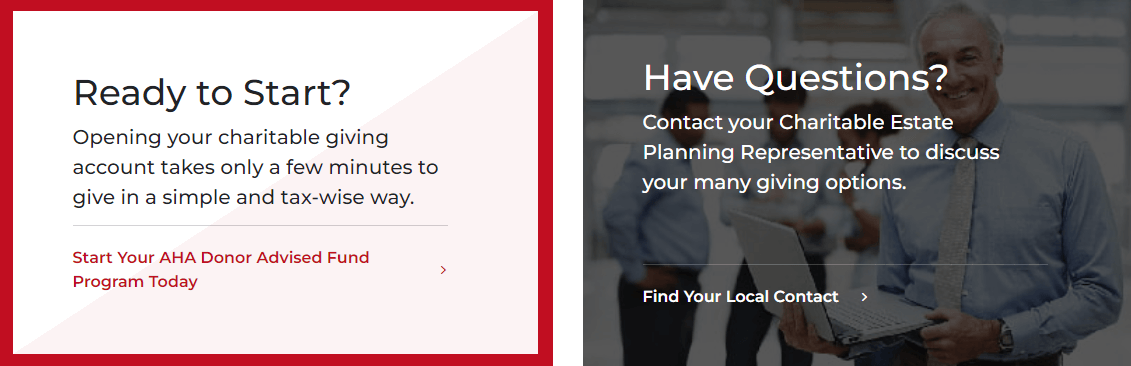
For example, the American Heart Association offers an effective example of useful calls to action (CTAs) for healthcare websites. Their donor stories end with CTAs that help visitors open a charitable giving account or reach out to a local representative with any questions. 

American Heart Association CTAs for opening a charitable giving account or contacting a representative

Welcome new donors with clear CTAs that allow website visitors to take the next step that aligns with their interests and needs. For example, your CTAs could say:

  • Support our scholarship fund today to help other students in need.
  • Leave a positive legacy with a planned gift.
  • Contact a local representative for more information about the impact of your gift.
  • Find the giving opportunity that works for you.

Your CTAs should be specific and welcoming, and they should lead to a user-friendly form or information page where supporters can take the next steps toward becoming donors or getting more involved in your cause. 


After optimizing your donor stories, promote them across multiple channels, including social media, email, and your printed newsletter. This will help reach a wider potential donor audience and ensure as many current donors as possible see your gratitude efforts. 

As Founder and CEO of Kanopi Studios, Anne Stefanyk helps create clarity around project needs, and turns client conversations into actionable outcomes. She enjoys helping clients identify their problems, and then empowering the Kanopi team to execute great solutions.

Anne is an advocate for open source and co-organizes the Bay Area Drupal Camp. When she’s not contributing to the community or running her thoughtful web agency, she enjoys yoga, meditation, treehouses, dharma, cycling, paddle boarding, kayaking, and hanging with her nephew.

3 Tips for Marketing Your Organization on a Limited Budget

Marketing your organization on a budget is easy when you know the right strategies and tools to use. Explore these top tips to step up your marketing strategy. 

By Melissa Mendez

Picture this: your organization is about to host another fundraising event. You’ve assembled a fundraising team, booked a venue, and put together the perfect program agenda. Once it comes time to get the word out about your event, you quickly realize you don’t have that much money left in your budget to create promotional materials and decide to deprioritize marketing. However, this results in low attendance numbers, causing you to miss the mark on your fundraising goal. 

If this sounds like a situation your organization has been in before, you need to update your approach to marketing. Even if you’re strapped for cash, there are a variety of ways to get the word out about your events, campaigns, and current initiatives without spending a single dollar! 

In this article, we’ll go over three money-saving tips that you can use to market your organization and get the support you need: 

  • Keep your website content fresh
  • Generate quality social media content
  • Create compelling email newsletters 

Whether you’re a dance studio hoping to promote your donation form for your year-end campaign or a nonprofit that wants to market its monthly giving program, the right marketing strategies and tools can help. Let’s dig into the essentials.

Keep your website content fresh

Your website is a rich information hub that acts as the focal point of your digital presence, but are you harnessing its full potential? By updating your website regularly and using it to spotlight your upcoming events, campaigns, projects, and more, you can successfully expand your reach and bring in new audiences for your organization. 

Leverage these cost-effective strategies to shape your website into a powerful marketing tool: 

  • Create event and campaign landing pages: Dedicated landing pages can help you dive deep into the details of your upcoming events and spotlight why it’s worth your audience’s time to register, donate, or take another relevant action. Cover all the logistical details, including the date and time of your event or campaign, its purpose, and how to get involved. Be sure to embed your registration or donation form directly into your landing page to help drive conversions and streamline your users’ actions. 
  • Share testimonials: Testimonials can provide great social proof that drives prospective audience members to support your organization. Create a testimonials page that features varied quotes from community members explaining why they support your organization or are eager to receive your services. For example, a dance studio might collect testimonials from students, parents, and alumni to show the value in signing up for classes. Similarly, nonprofits can feature testimonials from beneficiaries, explaining how your organization has made a difference in their lives. 
  • Generate blog content: Consistent blog content can keep community members tapped into your organization and eager to sign up for your upcoming events. Write content regularly, such as posting every other week to communicate important updates about your organization. To help offload the burden of creating content, you can also ask your beneficiaries, volunteers, donors, or loyal customers to create content reflecting on their experiences. 

As you refresh your website and create new content, make sure to widely promote these links to your audience. For example, if you recently created an event landing page to spotlight your upcoming peer-to-peer fundraising event, you could summarize the purpose of this event in your email newsletter and include a link to your landing page for people to learn more and register. 

Keep in mind that taking a multichannel approach, such as sharing links on social media or through QR codes in your direct mail, can help you direct multiple audiences to your website and keep your organization at top of mind. 

You might also leverage a dedicated communication app so you can more easily reach your target audience and ensure you have their support for your upcoming project. There are many cost-effective marketing platforms available that have built-in communication tools, so do your research to find the best solution for your organization. While investing in a marketing solution might seem like a big expense upfront, you’ll be able to derive a high ROI from it year over year, ensuring your organization can make back its investment and more. 

Generate quality social media content

With audiences spending more time on social media than ever before, regularly posting social media content is an easy money-saving strategy to ensure your content gets in front of your target audience. However, spamming content about your upcoming event or campaign can have the opposite effect, turning prospective audiences away from your organization and decreasing your engagement levels. 

Instead, construct a quality and intentional social media strategy that is tailored to your audience and supports your marketing goals. Use these tips to get started: 

  • Share a variety of visuals: Posting the same type of content over and over can quickly bore your audience. Generate a variety of visuals, such as photos from your latest event or infographics that highlight your organization’s impact, to grab your followers’ attention. You could also tap into the power of video, which can help you convey important information in an easily digestible format. Double the Donation’s guide to fundraising videos recommends keeping your video short and sweet and ending in a firm call to action so audiences know how to get involved. 
  • Use catchy hashtags to expand your reach: Hashtags can open up your community to new audiences and boost brand visibility. For example, if you’re a dance studio hosting a dance-a-thon, you might use the hashtag #DancingForACause or #DancingForDollars to create interest. You can also feature your dance studio name or city in your hashtag to draw local audiences to your event, such as #YourCityDanceAThon or #YourStudioNameDanceAThon. When participants post about your event, encourage them to pair it with your dedicated hashtag. 
  • Consider hosting social media contests: A social media contest is a great way to rally your whole community around your organization while growing your reach. You might ask supporters or customers to post videos about why they support your organization, and then award the audience member with the greatest number of likes or comments with a prize. Pair a hashtag with your contest and ask audiences to tag your account in their post so people in their personal networks can learn more about your organization. 

As you share content on social media, track metrics, like impressions and likes, to assess your performance. You may have to make adjustments to your content to better appeal to your audiences and drive greater engagement levels. 

Create compelling email newsletters

Your email newsletter is the perfect place to remind people of your upcoming activities and include links to your website and social media accounts. To strengthen your email newsletters and maximize their value, use these best practices: 

  • Include an eye-catching subject line: Your audience receives anywhere from tens to hundreds of emails a day. To stand out from the crowd you’ll need to create a brief, yet compelling subject line that piques your subscribers’ interests. For example, a subject line like “Don’t Miss Out On Our Annual Halloween Fundraiser!” or “Register Tonight for the Event Of the Season!” summarizes the central purpose of the newsletter while drawing the reader in so they feel motivated to open your email. 
  • Break up your content with visuals: Make your email newsletters even more engaging by adding a variety of visuals, like photos, videos, and graphics. Ensure these elements are reasonably sized to create a positive user experience and avoid using too many visuals so your audience isn’t overwhelmed. 
  • Use clear calls to action: Firm calls to action direct your audience to their next step so they can easily complete it. Create call-to-action buttons that stand out from the rest of your newsletter content and ensure they are hyperlinked to the relevant resource, like your donation page or event registration form. You’ll also want to use succinct, clear language that creates a sense of immediacy. For instance, a call to action like “Donate by midnight to get your gifts matched!” gets to the point quickly while using time-bound language to spur action. 

DanceStudio-Pro’s guide to dance studio marketing also recommends using email to show appreciation to your audience. Once your supporters complete a target action like donating or registering for an event, automate a thank-you email conveying your gratitude for their continued support. This practice will help you develop strong relationships with your audience that will benefit your organization for years. 

Wrapping Up

Marketing your organization doesn’t have to cost your team an arm and a leg when you have the right tools and strategies! Assess your existing toolkit and make adjustments to your marketing plan as needed to optimize your promotional strategies. Keep in mind that adding an all-in-one marketing platform to your tech stack can streamline your approach and help you save money in the long run. 

Melissa Mendez is the Operations Manager at Studio Pro, where she leads the Support, Customer Success, and Professional Services teams. Since 2019, Melissa has helped thousands of dance, cheer, gymnastics, and performing arts studio owners streamline enrollment, recital and showcase planning, ticketing, and accounting automation. She and her team deliver personalized onboarding, expert training, and ongoing support to make running a studio smoother and more sustainable.

A lifelong dancer who started at age three, Melissa built a successful mobile dance company that expanded to four locations across multiple states. Now based in San Antonio, Texas, she brings firsthand studio experience and operational expertise to every interaction—empowering studio owners to grow their businesses, strengthen their communities, and focus on what they love most: their students.

What is a Call-to-Action? A Quick Guide for Nonprofits

A well-worded call-to-action (CTA) can encourage your nonprofit supporters to engage with your cause in a myriad of ways. Learn more about CTAs in this guide!

By Ira Horowitz

Your nonprofit exists because you’re seeking to enact positive change in your community, whether that means tutoring at-risk high school students, cleaning local beaches, or providing meals to unhoused people. 

However, you can’t do it alone—you need your supporters to help you make that positive change happen. This means you have to not only inspire your supporters by informing them about your cause and opportunities to get involved, but also explicitly ask them to take action. 

That’s where calls-to-action (CTAs) come in. By incorporating well-worded and carefully-designed CTAs into your marketing materials, you can encourage your supporters to take the necessary steps to put their passion for your cause into action, whether you want them to donate, volunteer, attend an event, or simply learn more about your organization. 

Let’s take a deep dive into the specifics of CTAs to help you get started! 

Calls-to-Action (CTAs): An Overview

A call-to-action (CTA) is a short statement or phrase that compels someone to take a specific action. Here are some examples of everyday situations in which we’re compelled to take action thanks to a CTA: 

  • In social media posts: “Follow us,” “Click the link in our bio,” “Comment below” 
  • In TV commercials: “Visit our store,” “See it in theaters this Friday,” “Talk to your doctor today about…” 
  • On mobile apps: “Download now,” “Try for free,” “Upgrade to premium” 
  • On billboards: “Call now for a free quote,” “Book your vacation now,” “Take the next exit to…” 
  • On websites: “Sign into your account,” “Find a store,” “Learn more about us” 
  • In emails: “Register for our upcoming event,” “Shop this exclusive sale,” “Learn more”  

Recognizing the everyday places where you’re called to action can help you determine how you can better leverage CTAs for your nonprofit. For example, as you get better at identifying CTAs, you might find you could do a better job of writing CTAs in your Google Ads copy, on your donation form, or in your spoken presentations

4 Forms CTAs Can Take Online

Depending on the medium they’re presented in, CTAs can take different forms. While you may include CTAs on physical marketing materials (such as posters or direct mailings) or tap into channels like TV or radio, your online assets (such as your website) will likely be where you focus on driving action and engagement among your community of supporters. 

Here are some of the most popular types of online CTAs to keep in mind: 

  • Buttons: A button CTA is a clickable button with CTA text on your website, such as “Donate now” or “Login to your account.” 
  • Text: Sometimes a CTA can easily be woven into website page copy, linking to a resource for taking action or simply inspiring action. Here’s an example: To learn more about our mission, visit our “About Us” page.” In this case, you could add a link to the words “visit our ‘About Us’ page.” 
  • Pop-up CTAs: Although website pop-ups are controversial, they can be effective when used sparingly. For example, you might use a pop-up on your website that has a CTA to encourage visitors who have been on the site for a certain amount of time to subscribe to your email newsletter. 
  • Image CTAs: Similar to button CTAs, image CTAs are images that have CTA text and a link to whatever action page you’re trying to get your website visitors to check out. 

It’s up to you to determine which type of CTA will work best in your online marketing materials. Start by deciding which action you want your supporters to take and how you want to communicate that action. 

For example, you might want to encourage website visitors to donate through your online donation page. To do so, you could include a button CTA on your website’s homepage that says “Give Now” and links to the donation page. On the donation page, you could feature an eye-catching image of your beneficiaries and a paragraph explaining why donations help make your work possible. Then, you could end the paragraph with one last inspiring call-to-action sentence that says, “Donate today to help us change more lives for the better.” 

While you don’t want to overwhelm your supporters with too many CTAs, having multiple touchpoints like this on the journey to a completed action can encourage potential supporters to follow through and make a move!

How to Create Effective CTAs

No matter the type of CTA you end up using, there are some universal best practices for making your CTAs as effective as possible: 

Use strategic wording.

Choose the words for your CTAs with care so you can catch your supporters’ attention. Start with an action verb like join, sign up, discover, explore, donate, give, register, or shop. You should also choose words that instill a sense of urgency in your audience such as now, today, limited time, or exclusive. 

Example: “Donate today to save more sea turtles” is a much more effective CTA than a generic “Donate.” 

Make it brief.

When creating a CTA, get to the point by using only a few words. This will help you clearly communicate what you need your supporters to do. Plus, keeping your CTAs short ensures that you leave no room for misunderstanding. 

Example: “Register today for our bikeathon on July 11” will likely encourage more event registrations than “We are hosting a bikeathon soon and hope to see you there as a participant or volunteer. Please visit our registration page to get started.”   

Make careful placement decisions.

Where you put your CTAs on your website matters. After all, you need to ensure that they stand out from your other content and resources so they’re easy to see and click on. 

Example: You decide to put your “Donate Now to End Cancer” button in your static menu at the top of your web pages instead of at the bottom so it’s always visible no matter where your visitors go on your website.  

Pay attention to the visual design.

According to Cornershop Creative, color and specific styling are essential to creating a great CTA. Your designs should be eye-catching and consistent with the branding and style of your website. 

Example: You create an image CTA to encourage more people to sign up to foster shelter animals. You use your organization’s brand colors—red, white, and purple—and include an image of a shelter animal that is currently part of your foster program. 

Test and optimize.

As you begin adding CTAs to your website and other marketing materials, it may be helpful to test out different versions. Try asking a small group of your team members to identify what wording, visual look, and placements they think will be most effective for encouraging people to act. You can formalize this process using A/B testing.

Additionally, on your website, pay attention to how well your CTAs help boost conversions on your most important action pages, like your donation page or event registration page. You can monitor conversions with Google Analytics and use the insights you gather to improve your CTAs.

3 Examples of Eye-Catching CTAs

Still need some inspiration for creating a great nonprofit CTA? Check out these three examples of CTAs your organization can emulate. 

1. American Cancer Society 

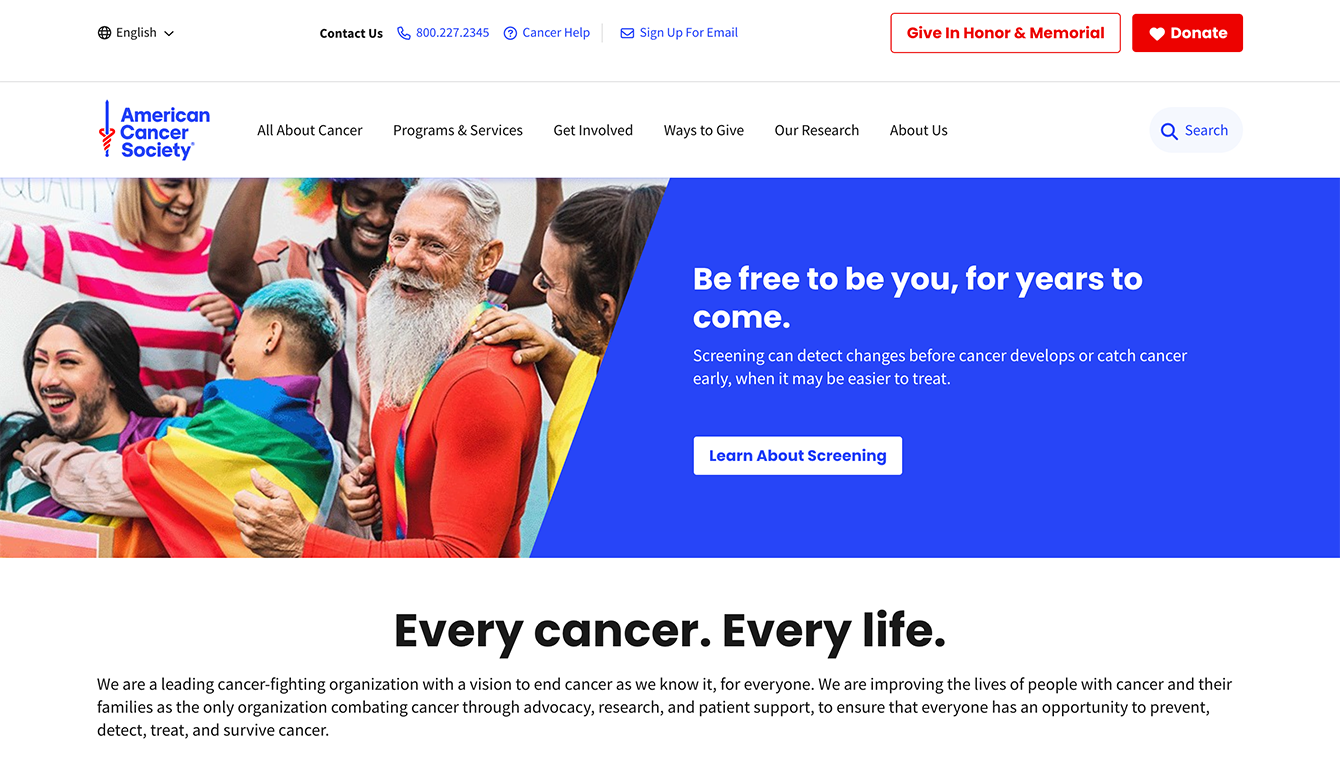
The CTAs on the American Cancer Society website are brief and clear, encouraging visitors to act quickly. 

The American Cancer Society homepage features a few CTAs without overwhelming its website visitors. Here are a couple of standout CTA moves that inspired us: 

  • The “Donate” button in the top right corner is bright red and features the image of a heart, which helps it stand out and emphasizes the difference a donation can make to those whose lives have been affected by cancer. 
  • The “Learn About Screening” CTA in the center of the screen is paired with an image of real people and language that encourages authenticity and getting a screening to stay healthy.

2. American Society for the Prevention of Cruelty to Animals

The CTAs on the ASPCA website have bright colors, emotionally-evocative images, and prominent placement to help encourage action. 

ASPCA does an excellent job of making its CTA buttons stand out with bright orange coloring and bold white text. The text and pictures that accompany the buttons on its rotating banner image also pull at your heartstrings and encourage you to give. 

In particular, the phrase “63¢ a Day Can Help Her Survive” not only implores website visitors to contribute a donation but also highlights how easy it is to make a difference to an animal in need. 

3. Save the Children 

The CTA on the Save the Children homepage is brief and encourages urgent action. 

The Save the Children website reserves the color red for its most important website elements—its logo and CTA buttons, helping them stand out against a white and gray background. Here are a few other reasons we love their CTAs: 

  • The phrase “For many kids living in poverty, summer isn’t fair” is effective in evoking emotion in website visitors.
  • This main button CTA is paired with an image of a child, emphasizing the human aspect of the organization’s mission.
  • Save the Children uses the word “now” to instill urgency in its website visitors, encouraging them to give right away.

CTAs are small additions that can make a big difference for your nonprofit. Use these examples and tips to start creating (or fine-tuning) your organization’s CTAs and pulling in more support for your mission. 

And, if you need the help of an expert, invest in a web design partner that can help you with everything from designing your website to crafting CTAs and beyond! 

With 15 years of experience, Ira Horowitz is an expert in nonprofit online communications and online fundraising. His work has resulted in increased funds and resounding supporter engagement for hundreds of organizations.

Ira oversees Cornershop Creative’s project management team and works with clients to provide them with the best possible final product. He also manages all of their strategic engagements and helps guide nonprofits to determine their long-term strategy goals for online communications.

How to Build Your Recurring Giving Program: 4 Tips

Recurring donors can provide valuable sustainable revenue for your nonprofit. Tap into the vast potential of a recurring giving program with these four tips.

I’m a big fan of recurring giving. It’s a great way to both boost revenue and your retention rate. In this guest post, Philip Schmitz of CharityEngine lets you know how you can build your recurring giving program.

By Philip Schmitz 

Acquiring recurring donors for your nonprofit can revolutionize your fundraising progress, helping you efficiently and effectively achieve your goals. You’ll need to invest time and resources to attract new support for your mission, but chances are you already have untapped potential in your existing connections.

To help you secure a reliable source of funding with recurring gifts, we’ll walk through these four essential tips:

  1. Add a recurring giving option to your donation page.
  2. Market your recurring gifts program.
  3. Leverage your CRM to boost recurring giving.
  4. Report the impact of recurring donations.

From regular volunteers to small-level repeat donors, your organization already has people dedicated to driving your nonprofit’s impact. Give them the opportunity to invest in your cause for the long run by establishing a recurring giving program.

1. Add a recurring giving option to your donation page.

Your nonprofit’s donation page is the primary location for prospective donors to give in support of your mission. Therefore, it’s essential to design your online giving page with everything that supporters may need to maximize their contributions.

As you optimize your donation page for recurring gifts, consider the donor experience. Make it easy and convenient for them to participate. Your donation form should have a checkbox option that allows donors to turn their donations into monthly gifts. Additional ways to further optimize your donation page include:

  • Specifying the impact of each recurring gift amount. Inspire your supporters to take action by giving examples of how each recurring giving amount will contribute to your organization’s on-the-ground impact. This allows them to see how they can make a tangible difference in your cause. For example, an animal welfare nonprofit could write that $20 will provide a shelter dog’s meals for one month, while $50 will cover its medical treatments.
  • Allowing donors to manage their accounts. Offer your donors the flexibility to change their account profiles, recurring gift amounts, payment methods, and any other relevant information online. Your supporters will feel much more comfortable getting involved in your recurring giving program if they have the freedom to adjust their enrollment whenever they’d like.
  • Accepting multiple secure payment options. Facilitate recurring payments by having multiple payment options featured clearly on your nonprofit’s donation page. Donors should be able to pay for recurring gifts with their debit or credit cards, by direct deposit, or using mobile payment services like PayPal.
  • Ensuring your giving page is mobile-friendly. These days, much of the world’s online interactions occur on mobile devices. Whether they’re on the go or relaxing at home, make sure your potential donors can access a high-quality version of your donation page on their tablets or smartphones as well.

According to 360MatchPro’s fundraising statistics, recurring donors contribute 42% more per year than one-time donors. Make the most of this valuable opportunity by setting up your online giving page to promote recurring giving.

2. Market your recurring giving program.

The success of your nonprofit’s recurring giving program depends on how well you spread the word. It’s crucial to not only make your supporters aware of this option, but also motivate them to become recurring donors. Send email updates to your existing donors with information on how to enroll in recurring giving, along with how these gifts will benefit your nonprofit.

To notify as many potential donors as possible, disperse your communications across multiple channels. Appeal to younger donors by creating memorable and engaging social media posts that promote your program. And, as you approach the end of the year, CharityEngine’s year-end giving guide recommends checking back in with your recurring donors and encouraging new enrollment during this popular giving time.

Go further with your marketing by creating a page on your website specifically for your recurring giving program. This will ensure that your supporters have a single, authoritative resource on all there is to know about the program, including the steps for opting in and who to contact with any additional questions.

Tie together all of your web pages and communications with consistent branding and visuals such as your organization’s colors, logo, and photos related to your mission. This way, prospective donors can feel confident that enrolling in the program will directly benefit your nonprofit.

3. Leverage your CRM to boost recurring giving.

Aside from having a CRM with billing software to automatically process recurring donations, use its capabilities for data-driven outreach. The more you understand your supporters, the better you can appeal to them to participate in your recurring giving program.

Segment your donors based on the information in their profiles and tailor your communications to those who may be most interested in becoming recurring donors. Look for repeat donors who tend to give relatively small amounts. They’d likely be receptive to automated monthly payments to support your cause. Some common ways to segment your donors include:

  • Giving history
  • Relevant interests
  • Past involvement with your nonprofit
  • Communication preferences

With these donor segments, you’ll be able to boost the effectiveness of your communications by sending messages that are more relevant to your individual supporters. They’ll feel more valued if you acknowledge their preferences and interests when reaching out about your recurring giving program. 

Furthermore, you can use the recurring gift data you collect in your organization’s CRM to personalize messages to your existing recurring donors as well. For instance, if they tend to give $15 a month, your next email to them could suggest that they increase their monthly gift to $20 a month to power your upcoming initiatives.

4. Report the impact of recurring donations.

The key to maintaining long-lasting support for your nonprofit is regularly updating and thanking your supporters. Even though their gifts are automated, your recurring donors still need to be recognized for their contributions each time they give. 

Be sure to have automatic follow-up emails in place to confirm and express gratitude for every recurring donation you receive. Remember to personalize each message with the donor’s name to show them that your organization values them as an individual. For additional ways to appreciate your recurring donors, consider the following ideas:

  • Mail handwritten thank-you cards at least once a year.
  • Host exclusive monthly donor appreciation events.
  • Spotlight longtime recurring donors as part of your nonprofit social media strategy.
  • Send small gifts of branded merchandise.

By communicating the impact of their contributions and the goals you’ve been able to achieve with their help, you’ll ensure that supporters stay enthusiastic about supporting your mission. Incorporate key data points into a powerful impact story to help them emotionally connect with the positive change they’re contributing toward.


Take advantage of your CRM’s capabilities to guide your communications about recurring giving and more. Your current donor profiles are incredibly useful for identifying ways to encourage further engagement from your supporters. Prioritize your donors’ interests to maximize your fundraising results. With a data-driven approach, you’ll be able to build an optimized recurring giving program that opens up a source of sustainable revenue for your nonprofit.

Philip Schmitz is the CEO and founder of cloud-services leader BIS Global, creators of the CharityEngine fundraising & communications technology platform. Founded in 1999, Phil has managed the vision and strategy for BIS’s suite of integrated business applications & hosting tools used by more than 400 businesses & non-profits.

4 Storytelling Tips for Your Online Donation Page

Storytelling is a powerful way to strengthen people’s connection with your cause and inspire support. Use these storytelling tips for your online donation page.

By Murad Bushnaq

People have been telling stories for at least 30,000 years. Whether we’re sharing them out loud, in writing, or with pictures, stories unite us through empathy and understanding. 

Because of this, storytelling is an essential skill for nonprofits to master. By telling stories that help people connect with your cause, you’ll generate more support to push your organization closer to achieving its mission.

While you won’t be recording stories on cave walls as people did thousands of years ago, thanks to modern technology, you have many excellent tools at your disposal for sharing stories related to your cause, such as your nonprofit’s website. Your donation page, in particular, is an essential place for inspiring donors to support your organization.

We’ve rounded up four tips for leveraging your content management system (CMS) to help you make the most of your donation page’s storytelling potential:

  1. Incorporate engaging visuals.
  2. Share real people’s stories.
  3. Use emotionally compelling language.
  4. Craft strategic CTAs.

As you begin to enhance your donation page and other parts of your website with strong storytelling, think about which stories will resonate most with your audience members. Keeping your audience in mind ensures that your stories will leave a lasting impression, inspiring ongoing support.

1. Incorporate engaging visuals.

In some ways, a picture can be worth a thousand words. While effective writing is vital to sharing your organization’s stories, images can enhance your message by conveying what words cannot. Visual storytelling has the power to stir up emotions upon just the briefest of glimpses, elevating the information spelled out on the page.

As you begin selecting your nonprofit’s visuals and planning how you’ll incorporate them into your donation page, keep these tips in mind:

  • Photos of your beneficiaries can cultivate empathy. Tap into your supporters’ empathetic side by featuring pictures of your nonprofit’s beneficiaries on your donation page. This allows prospective donors to see who their donations are helping and how they’re actively making a difference in people’s lives. Of course, you’ll want to get permission from your beneficiaries first.
  • Ensure that your images match your nonprofit’s branding. Unify your donation page by ensuring that the visual branding is consistent with the rest of your website.
  • Use your CMS to optimize your images. The right nonprofit CMS can ensure that your images are up-to-par for a professional and conversion-driving donation page. Use your CMS to convert your images to web-friendly versions and resize them appropriately. Additionally, you can zoom and crop your images to get your desired focus.
  • Consider adding other multimedia elements. Consider adding a short video or audio clip to your donation page to further encourage donors to give. Incorporate these elements thoughtfully—they should compel supporters to complete the giving process, rather than distract from it.
  • Tie relevant images to your suggested donation amounts. By adding relevant images to the suggested donation amounts on your page, you can make it easier for prospective donors to visualize the specific impact their gifts will have, whether that’s providing meals to shelter animals with a donation of $10 or covering their medical treatment with a donation of $50.

Pet Rescue’s online donation page includes images with each of its programs so supporters can see the impact their donations will have.

To maximize your results, take a look at other stellar donation page examples, like Pet Rescue, for inspiration and guidance. Morweb’s list of the best nonprofit websites walks through a number of additional websites that effectively convey the organization’s purpose and provide an excellent user experience.

2. Share real people’s stories.

In addition to including pictures of your nonprofit’s beneficiaries on your donation page, share their written stories so your supporters can associate a name and a face with your cause. This ensures that your mission stands out from the crowd and compels donors to take action.

Some impactful ways to share people’s stories on your donation page include:

  • Presenting a story about a specific individual at the top of your donation page. When a potential donor navigates to your donation page, your goal is to have them complete the giving process. Grab their attention at the top of your page by sharing a specific beneficiary’s story. Keep the written copy concise, describing the individual’s background and clearly explain how the donor can help make a difference.
  • Using your CMS to create a section of “testimonials” for supporters to scroll through. Gather quotes from your beneficiaries to use as short testimonials on your page. This allows you to communicate multiple stories at once without slowing donors down in their giving journey.
  • Adding a gallery of beneficiary pictures that lead to specific stories. For those of your supporters interested in exploring more about your impact, use your CMS to create a gallery of pictures that act as buttons to access specific beneficiary stories. A striking visual and a call to action (CTA) like “Read Joseph’s recovery story” or “Learn more about Whisker’s adoption journey” can capture donors’ interest and motivate them to read.

No matter how you decide to share your beneficiaries’ stories, remember that they are real people. Use plain language and aim to capture their real voices, perspectives, and journeys. This ensures that your stories feel more authentic to donors, which adds legitimacy to your nonprofit’s cause. Once again, be sure to ask permission to include your beneficiaries’ stories, and you always have the option of changing peoples’ names to protect their privacy.

3. Use emotionally compelling language.

Every word in a story counts, contributing to its overall message and emotional impact. Therefore, it’s essential to be thoughtful with your words when writing a story to share on your donation page.

Use these best practices to tap into your readers’ emotions:

  • Be descriptive. Remember when your high school English teacher taught you the “show, don’t tell” rule? It still applies here. For instance, if you’re an animal shelter, go beyond sharing that you recently took in a homeless dog and found it a home. Describe the conditions you found the dog in, then elaborate on how the dog looks and behaves after you saved it. Descriptions and details make your story much more emotionally captivating.
  • Include the donor in the story. According to GoodUnited, the more personal your messaging is, the more impact you’ll have on each reader. Use pronouns like “you,” “your,” “we,” and “our” so donors can feel a part of your story’s narrative. This will make them more invested in your nonprofit’s cause. For example, you might write a sentence like, “Because of donors like you, we were able to provide 500 meals to families in need.”
  • Illustrate how your organization can provide solutions to problems. A story needs both a conflict and a resolution. Once you’ve presented donors with the problem you’re focused on solving, indicate how, with their support, you’re going to solve it. This can go a long way toward convincing donors that your organization is the one they should support because you’ll be able to make an actual difference.

You don’t need to be a trained writer to construct an emotionally engaging story for your donation page. Simply focus on providing details and emphasizing the solutions to the problem you’re aiming to address. This way, you can effectively build an emotional connection between readers and your cause.

4. Craft strategic CTAs.

A call to action (CTA) is a statement that encourages someone to complete an action. On your nonprofit’s donation page, you should feature CTAs encouraging your donors to take action after learning about your cause or a specific beneficiary’s experience with your organization. Those CTAs can lead donors to:

After someone donates online they should be taken to a thank you landing page. Besides saying thank you, you can include other CTAs that provide additional engagement opportunities for your donors, so be open to incorporating them into your storytelling.

  • Subscribe to your email newsletter.
  • Register for an upcoming event.
  • Sign up for a volunteer opportunity.
  • Advocate for your cause online.
  • Share your donation page on social media.

When crafting a CTA, keep it clear and simple, but remember to make it specific to your cause. For instance, “Give now to help stomp out cancer” will be more effective than just “Give now.”

Additionally, you can use your CMS to make your CTAs into buttons that link to other resources, like your donation form or volunteer page. Including these within a story can break up the text and ensure that when a supporter feels inspired to act, they can do so right away.

The Gist

By leveraging powerful storytelling, your nonprofit can level up its donation page and inspire more supporters to give. As you’re tapping into the human element of your stories and using your CMS to enhance them with visuals and CTAs, remember to track metrics such as the average time visitors spend on the page to evaluate the effectiveness of your efforts.

As you delve deeper into optimizing your donation page, take a look at donation page templates if you need a little added guidance. Stories, when crafted well, can motivate supporters to act and stay invested in your nonprofit for the long term. By continually fine-tuning your storytelling efforts, you’ll improve your results over time and boost the revenue you need to further your purpose!

Murad Bushnaq is the Founder and CEO of Morweb. Since its inception in 2014, Murad has acted as Creative Director and Chief Technologist to help nonprofits spread their vision online through engaging design, intuitive software, and strategic communication.

How You Can Simplify Your Donor Communication

Over the years I’ve realized the importance of keeping things simple. We have so many choices of activities to fill our time (many of them involving screens), but I often find pleasure in simple things such as taking a walk, reading, and doing yoga.

Keeping it simple doesn’t have to mean a bare-bones existence. There’s a Swedish term called lagom meaning everything in moderation or not too much, not too little. Or think of Goldilocks and choose what’s “just right.” This can apply to how much information we take in about the economy, politics, discrimination, climate change, etc. – enough to know what’s going on, but not too much so it’s overwhelming. 

Keeping things simple is also important for your nonprofit organization. There’s a lot of uncertainty out there. Fundraising numbers are down. Maybe you’re struggling to get things done.

Even so, you need to continue to raise money and communicate fairly regularly with your donors, while not taking on too much. Donors may be navigating uncertain situations, but they want to help if they can and they want to hear from you. What they don’t want is a lot of complex content and too much information.

Here are a few ways to simplify your donor communication without making it too difficult for you.

Keep it simple by planning ahead

If communicating regularly with your donors sounds overwhelming, plan ahead by using a communications calendar. You should be in touch every one to two weeks, if possible. Otherwise, aim for once a month. Fill your calendar with different ways to do that and update it as needed. A good rule of thumb is – ask, thank, report, repeat. And as I mention below, you can keep it simple with shorter communication.

Keep it simple by sticking to one call to action

Your communication needs to be clear. Before you send an email message or letter, ask what is your intention? Is it to ask for a donation, say thank you, or send an update?

Stick to one call to action. Suppose you send a message that includes requests for a donation, volunteers, and for people to contact their legislators. It’s likely your donors won’t respond to all of your requests and may not respond to any of them. Send separate messages for each request. 

You’ll also have better results if you send your messages to the right audience. For example, if you’re looking for volunteers for an event, reach out to past volunteers and ask them to bring a friend, as opposed to sending out a message to everyone on your mailing list. This way you won’t be subjecting people to messages that may not be relevant to them.

In your fundraising appeals, don’t bury your ask. You can start with a story, followed by a clear, prominent ask. Recognize your reader. Thank previous donors and invite potential donors to be a part of your family of donors.

Your thank you letter or email should thank the donor. Simple, right? Make them feel good about giving to your organization. Welcome new donors and welcome back returning donors. You don’t need a lot of wordy text explaining what your organization does.

Keep your messages simple, yet sincere, and include a clear call to action.

Keep it simple with shorter, easy-to-read messages

Plain and simple, if your communication is too long, most people won’t read it. 

Limit print communication, such as newsletters and impact/annual reports, to four pages or less. Your email messages should be just a few paragraphs. On the other hand, you don’t want to be terse or say too little.

“I didn’t have time to write a short letter, so I wrote a long one instead.” Mark Twain

Be sure your communication is easy to read and scan. Use short paragraphs, especially for electronic communication, and include lots of white space. Don’t clutter up the page. Use at least a 12-point font with dark type on a light background – basic black on white is best.

Keep it simple by using conversational language

I find it annoying when I read an appeal letter or newsletter article that sounds like a Ph.D. thesis. Write at a sixth to eighth-grade level. That’s what most major newspapers do. This is not dumbing down. You’re smartening up by ensuring your donors will understand you. There are programs out there that can help you determine the reading level of your content. Plus, you can raise more money if your messages are easy to read.

Keep out jargon and other confusing language. Instead of saying something like – We’re helping underserved communities who are experiencing food insecurity, say  – Thanks to donors like you, we can serve more families at the Northside Community Food Pantry. 

We’re seeing real people being affected by real problems. Don’t diminish this with jargon and other vague language.

Use the active voice and there’s no need to get fancy by using a lot of SAT vocabulary words. Again, you want your donors to understand you.

Keep it simple by creating a clutter-free website

Your website is still a place where people will go to get information. Make sure it’s clear, clutter-free, and easy to read and navigate. Don’t forget about short paragraphs and lots of white space.

One of the most important parts of your website is your donation page. It needs to be easy to use and collect enough information without overwhelming your donors. If it’s too cumbersome, they may give up and leave. What’s known as form abandonment can happen on other web pages, too.

If it’s a branded donation page (e.g. not a third-party site), make sure it’s consistent with your messaging and look. Don’t go too minimalistic, though. Include a short description of how a donor’s gift will help you make a difference, as well as an engaging photo.

Make it easier for your nonprofit and your donors by keeping things simple.